


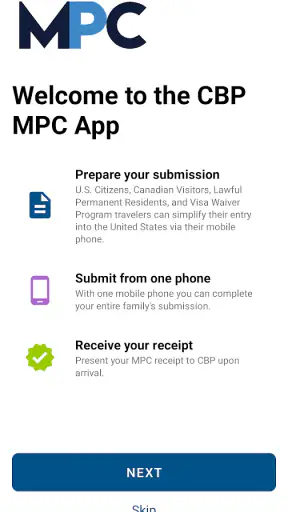
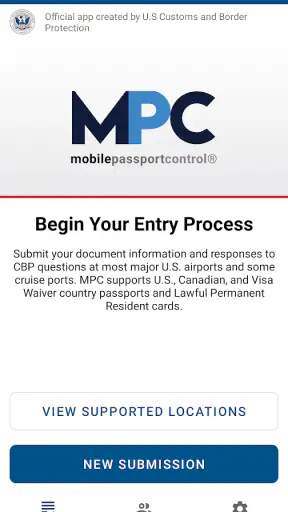
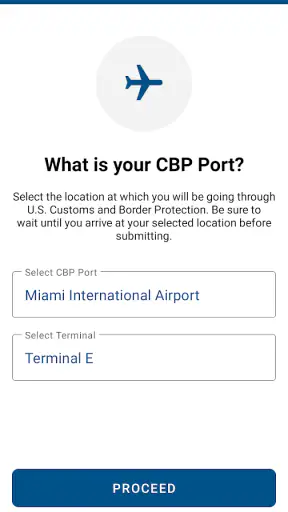
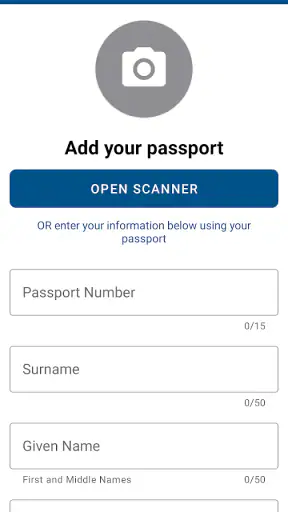
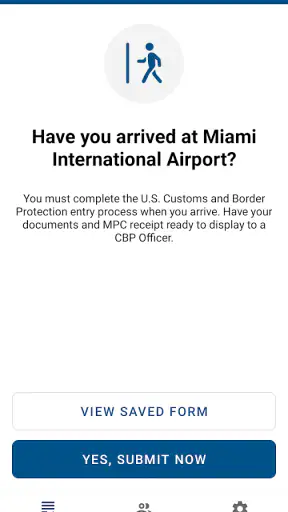
When I first looked at Mobile Passport Control, its appeal was easy to understand: it promises a less awkward way to handle part of the U.S. entry process. It is a free Travel & Local app from U.S. Customs and Border Protection, and the idea is practical rather than flashy. You are not downloading it for entertainment or for a trip-planning dashboard. You are downloading it because an airport arrival can be tiring, and any legitimate way to make that moment more organized is worth considering.
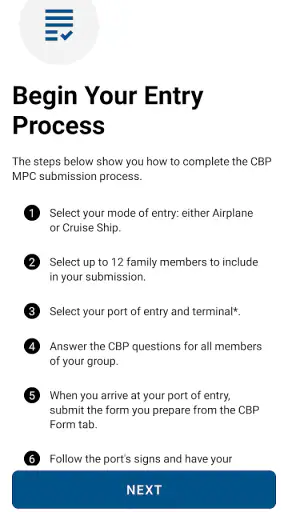
My first impression was that this is an app with a very specific job. It does not try to replace every travel tool on your phone. Instead, it focuses on Mobile Passport Control, giving eligible travelers a digital route for submitting the information needed during entry. That narrow purpose is also its main strength: there is less clutter to learn, and the app is easier to understand than a broad travel platform packed with hotel offers, maps, alerts, and promotions.
The store summary describes it as a way to streamline U.S. entry, but I found the more useful question was whether it would still deserve space on my phone after the first trip. The answer depends heavily on how often you enter the United States, whether your airport supports the process you need, and whether you are willing to prepare before reaching the inspection area. For occasional travelers, it may feel like a tool you install, use, and forget. For frequent arrivals, it has a stronger chance of becoming part of a repeatable routine.
What the first week feels like
During the first week, the strongest benefit is not excitement; it is reduced uncertainty. International arrivals often involve several small tasks at once: keeping travel documents accessible, following airport signs, managing luggage, and paying attention to the next instruction. An app dedicated to one stage of that journey can help separate that task from everything else.
I would not describe the experience as completely hands-off. You still need to read the prompts carefully and provide accurate information. The app cannot make an airport less busy, and it cannot remove the need to follow directions from border officers. What it can do is give you a structured digital step before you reach the point where your entry is reviewed. That distinction matters, because people expecting an automatic fast pass may be disappointed.
The first practical tip I would give a new user is to prepare before landing rather than waiting until the airport feels crowded. A phone with a low battery, poor connectivity, or a rushed traveler trying to complete every step while standing in a queue is not the ideal combination. Even when the app itself is straightforward, airport conditions are not always calm. I would open it with enough time to understand the current instructions, keep my travel details nearby, and avoid treating the process as something to improvise at the last second.
Another useful habit is to think about the app as part of an arrival checklist, not as a replacement for documents. I would still keep the travel documents and other information required for entry readily available. The app is a convenience layer. It does not change the importance of answering questions accurately or complying with the instructions given at the airport.
That is where the first-week appeal becomes clear. The application is free, carries an Everyone content rating, and is maintained by the government agency responsible for U.S. Customs and Border Protection. Those details do not guarantee a frictionless arrival, but they make the app feel more appropriate for its purpose than an unofficial tool trying to imitate an official process. Its average rating is 4.9 from around 141 thousand ratings, which suggests that many travelers find the basic experience worthwhile, although a rating cannot tell you whether your specific airport or travel situation will be equally smooth.
A realistic arrival scenario
Imagine arriving in the United States after a long overnight flight. You are traveling alone, your phone is still charged, and you have already reviewed the app before leaving the aircraft. Instead of beginning the process with a vague search for what to do next, you use the application to complete the relevant entry step, then follow the airport’s signs and staff instructions. The value here is not that the app magically moves you to the front of every line. The value is that one part of the process is organized before fatigue makes small decisions harder.
Now change the situation. You are traveling with a group, one person has a nearly empty battery, another is unsure which information to enter, and the airport connection is unreliable. The same app may still help, but the preparation advantage becomes much more important. I would not rely on it as the only plan. A family or group should agree in advance on who is handling the phone, make sure everyone understands the required steps, and avoid assuming that one person’s completed submission automatically solves every traveler’s part of the process.
This is one of the less obvious trade-offs. A digital process can reduce paperwork and mental clutter, but it also concentrates responsibility in a phone. If the device is unavailable or the traveler is not ready to use the application, the convenience can quickly turn into another thing to troubleshoot.
Why it may keep earning a place month after month
Mobile Passport Control has more lasting value for people who enter the United States repeatedly. A frequent traveler can build a simple routine around it: check the app before departure, complete the relevant information at an appropriate time, and use the airport’s instructions to finish the process. Once that routine is familiar, the application does not need to be exciting to be useful.
I like this kind of utility because it does not demand daily attention. There is no reason to browse it for entertainment, and there is no benefit in opening it simply to pass time. Its recurring value appears at the exact moment it is needed. That can make it easy to overlook between trips, but it also means the app is not competing for attention when you are at home.
The current version is 4.5.1, and the app supports Android 7.0 and later. For someone using an older Android phone, that minimum requirement is worth checking before travel rather than discovering a compatibility problem at the airport. On a supported device, I would still update it before a major trip, not because every update changes the experience dramatically, but because an entry-related tool is not the place where I want to discover that my installed version is outdated.
Its scale also gives it credibility as a continuing utility. It has more than one million installs and around three thousand reviews, while remaining free to download. Those figures are useful context, but they should not be mistaken for a promise that every arrival will be faster. Airport procedures vary, and the app’s usefulness depends on the actual conditions surrounding your trip.
The best recurring use case is a traveler who makes several U.S. entries and wants one consistent method rather than relearning the process each time. I can also see value for someone who dislikes handling paper forms or who prefers having a clear digital workflow. The app is particularly sensible when the traveler is comfortable reading instructions on a phone and preparing before reaching the inspection area.
It is less compelling for someone who takes one international trip every few years and does not want another travel-related application to remember. In that case, the setup effort may feel larger than the long-term benefit. The usual alternative is simply following the airport’s standard entry process with the documents and instructions already required. That approach is less specialized, but it avoids depending on an additional app and may be perfectly adequate for an infrequent traveler.
How it compares with ordinary alternatives
Compared with relying only on the standard airport process, this app offers more preparation and structure. The usual method is familiar and does not require learning a dedicated tool, but it may leave you handling every step in the moment. Mobile Passport Control shifts some of that work earlier and puts it into a guided digital flow.
Compared with a general travel app, its advantage is focus. A typical travel application may help with flights, reservations, maps, or packing, but those features do not directly address this particular stage of entering the United States. I would not install a broad travel app expecting it to provide the same role. Conversely, I would not use Mobile Passport Control as my main trip organizer. The two categories solve different problems.
There is also a difference between convenience and certainty. A paid travel service, a membership-based airport program, or another expedited-entry option may suit a traveler who wants broader benefits or more predictable access across many journeys. Mobile Passport Control is more narrowly useful. Its appeal comes from being free and official, not from promising that it replaces every other entry arrangement.
The maintenance burden is small, but not zero
The app does not require the kind of maintenance associated with social networks, shopping platforms, or subscription services. I do not see its value in constant engagement. The maintenance is mostly situational: keep the application installed, use a supported operating system, check for updates before traveling, and make sure the phone is ready when you arrive.
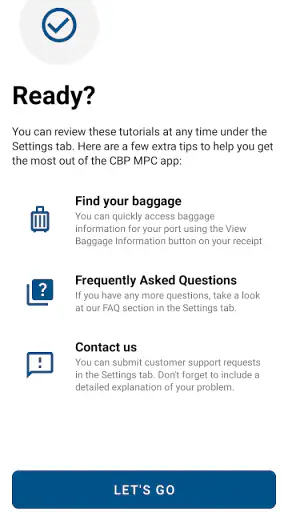
That sounds simple, yet travel is exactly when small oversights become noticeable. I would place the app in a pre-trip checklist several days before departure. That gives me time to update it, check the device, and become familiar with the current flow without standing in an airport queue. I would also avoid deleting it immediately after a trip if another U.S. entry is likely soon; keeping it available makes the next preparation step easier.
One advanced but practical habit is to separate app readiness from travel-document readiness. Updating the application does not replace checking passports, itinerary details, or any other documents needed for the journey. Likewise, having those documents ready does not mean the digital submission has been completed. Treating the two as separate checklist items prevents a common mistake: assuming that one completed task covers the other.
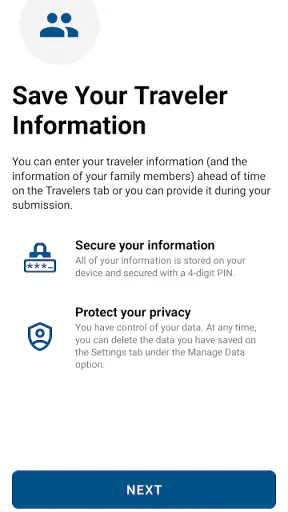
Another point is device ownership. If you are traveling with a partner or family, decide whose phone will handle the process and make sure that person is not the one most likely to be asleep, separated from the group, or dealing with a dead battery after landing. This is not a glamorous feature, but it is the kind of planning that determines whether a travel app feels helpful or irritating.
The maintenance burden is therefore low for a prepared traveler and higher for someone who downloads it while already in transit. I would not call that a flaw unique to this application; it is a consequence of using a phone during a time-sensitive airport procedure. Still, it is important to be honest about it. The app saves effort only when the user gives it a little attention beforehand.
Where fatigue and frustration can appear
The main source of fatigue is the gap between what the app can organize and what it cannot control. You may complete the digital part correctly and still face a busy airport, unclear signage, a delayed connection, or instructions that require you to ask staff for clarification. If you judge the app only by whether it eliminates waiting, you may decide it failed even when it completed its narrower job.
I also think the process can feel less comfortable for travelers who are already overwhelmed by official forms. A guided interface is helpful, but it still asks you to slow down and read carefully. Rushing through prompts because other passengers are waiting behind you is exactly when errors or confusion become more likely. My advice is to resist the pressure to operate at queue speed. Prepare earlier, and use the airport stage for following directions rather than trying to learn the application from scratch.
Groups introduce another layer of friction. The person who installs the app may understand it, while other travelers assume that person has handled everything. That assumption can create confusion. I would explain the plan to the group before departure and make sure each traveler knows what information or action may still be required from them. The app is easier to use when everyone treats it as a shared travel procedure rather than one person’s private shortcut.
There is also a psychological limitation: official does not mean universal. The developer is U.S. Customs and Border Protection, which is reassuring for authenticity, but the app still belongs to a particular U.S. entry process. It is not a general immigration assistant, a visa adviser, or a replacement for reading the requirements that apply to your circumstances. Travelers with unusual documentation situations or questions about eligibility should not assume that a convenient interface answers those questions for them.
For that reason, I would skip this app if I wanted a broad travel companion, itinerary management, or destination discovery. It is also not the right choice if I expected a guaranteed result regardless of airport conditions. In those situations, a general travel tool or a different official entry arrangement may be more suitable. The narrowness that makes Mobile Passport Control clean and purposeful also limits what it can do.
Who benefits most from it
I would recommend it first to travelers who enter the United States often enough to appreciate a repeatable routine. It is also a good fit for people who prefer digital preparation, keep their phones organized, and are willing to check instructions before arriving at the airport. The free price removes an obvious barrier, and the Everyone rating makes it broadly approachable from an app-store perspective.
I would be more cautious recommending it to a traveler who rarely flies internationally, dislikes handling official tasks on a phone, or will be traveling with a device that may not meet the Android requirement. That person may find the standard process simpler because there is no new workflow to remember. The right choice is not always the more modern one; sometimes the familiar route creates less stress.
For families, the decision depends on preparation. The app can be useful when one adult organizes the arrival plan and everyone understands their role. It may be less comfortable when children, older relatives, or companions with limited phone access are expected to manage the process without help. I would use it as an additional option, not as the only plan for a complicated group arrival.
My long-term verdict after the novelty fades
Mobile Passport Control earns lasting space on my phone because its usefulness is tied to a recurring travel problem rather than a temporary novelty. I do not need to open it every week for it to justify itself. When I have a U.S. arrival ahead, it gives me a focused preparation step and a clearer sense of what I need to handle digitally before reaching the inspection area.
Its strongest qualities are its official origin, focused purpose, free availability, and low ongoing maintenance. The high average rating and broad install base reinforce the impression that it is a mature utility rather than an experiment, while the current version shows that it remains actively relevant to users. Still, those signals should support a decision, not replace one. The app cannot guarantee a short line, remove every airport variable, or answer every entry question.
My lasting recommendation is therefore conditional but positive: install it if you expect to use Mobile Passport Control during U.S. arrivals and are comfortable preparing on your phone. Update it before the trip, check the device you plan to use, and keep the app separate in your mind from your other travel documents. Those small habits make a noticeable difference.
If you are an occasional traveler who wants the fewest possible steps, the conventional airport process may remain the better fit. If you travel frequently and value a repeatable routine, this is the kind of quiet utility that becomes more valuable after the first impression wears off. It is not an all-purpose travel app, and it does not need to be. Its job is narrow, but for the right arrival, that narrow focus is exactly why I would keep it installed.


